DBmarlin MCP Server
New in DBmarlin 6.10.0. The MCP server is an optional add-on.
The DBmarlin MCP (Model Context Protocol) server lets AI assistants such as Claude Desktop, Claude Code, Cursor and VS Code query DBmarlin in plain language.
The main use is root cause analysis. For example, you can ask "triage my SQL Server instance between 9 and 10am this morning". The assistant asks DBmarlin to triage the instance, then follows up with more detailed questions as needed. It then writes up the analysis in the chat, with the root cause, the evidence, recommended actions and links into the DBmarlin UI.
- VS Code
- Claude
- ChatGPT
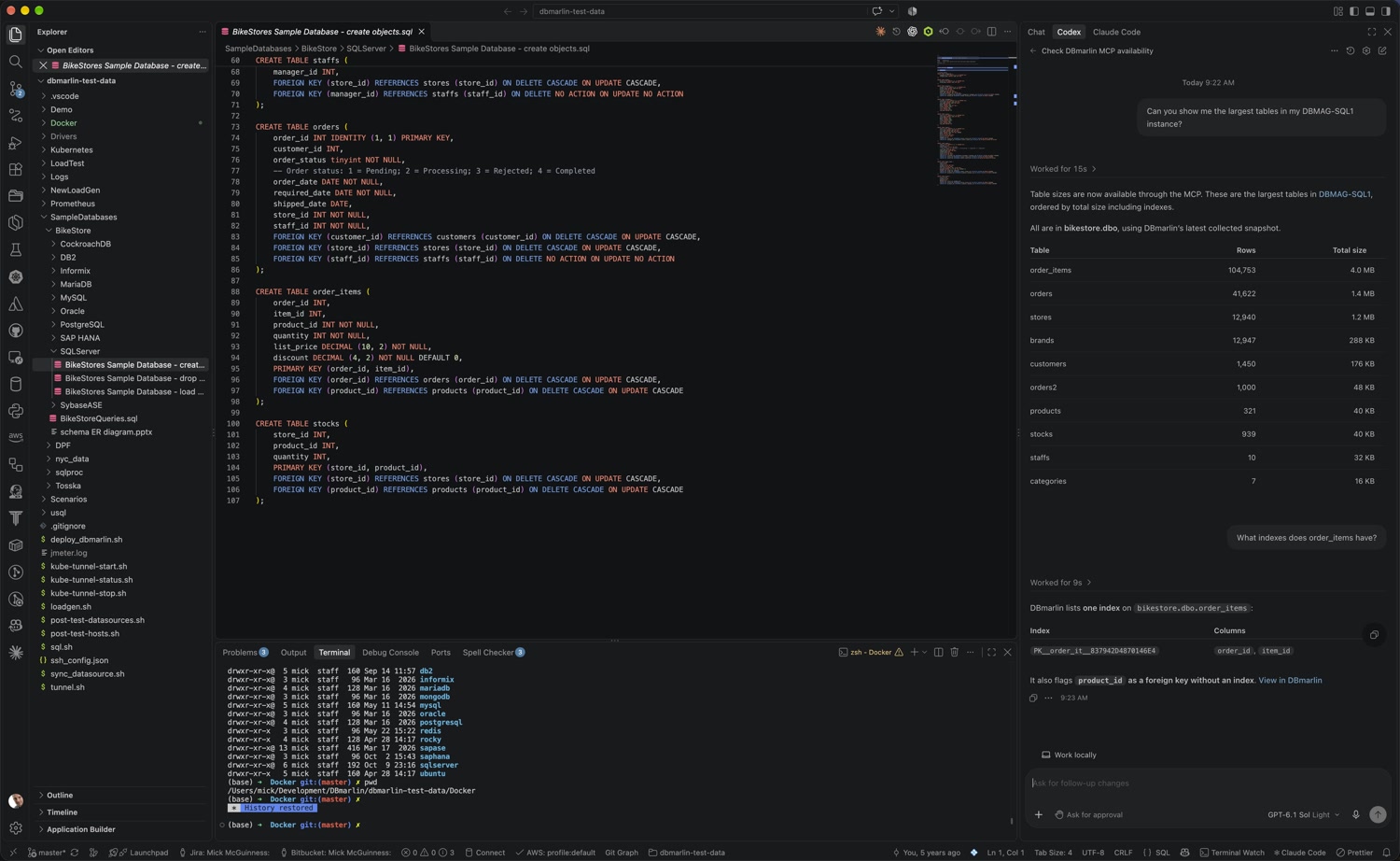
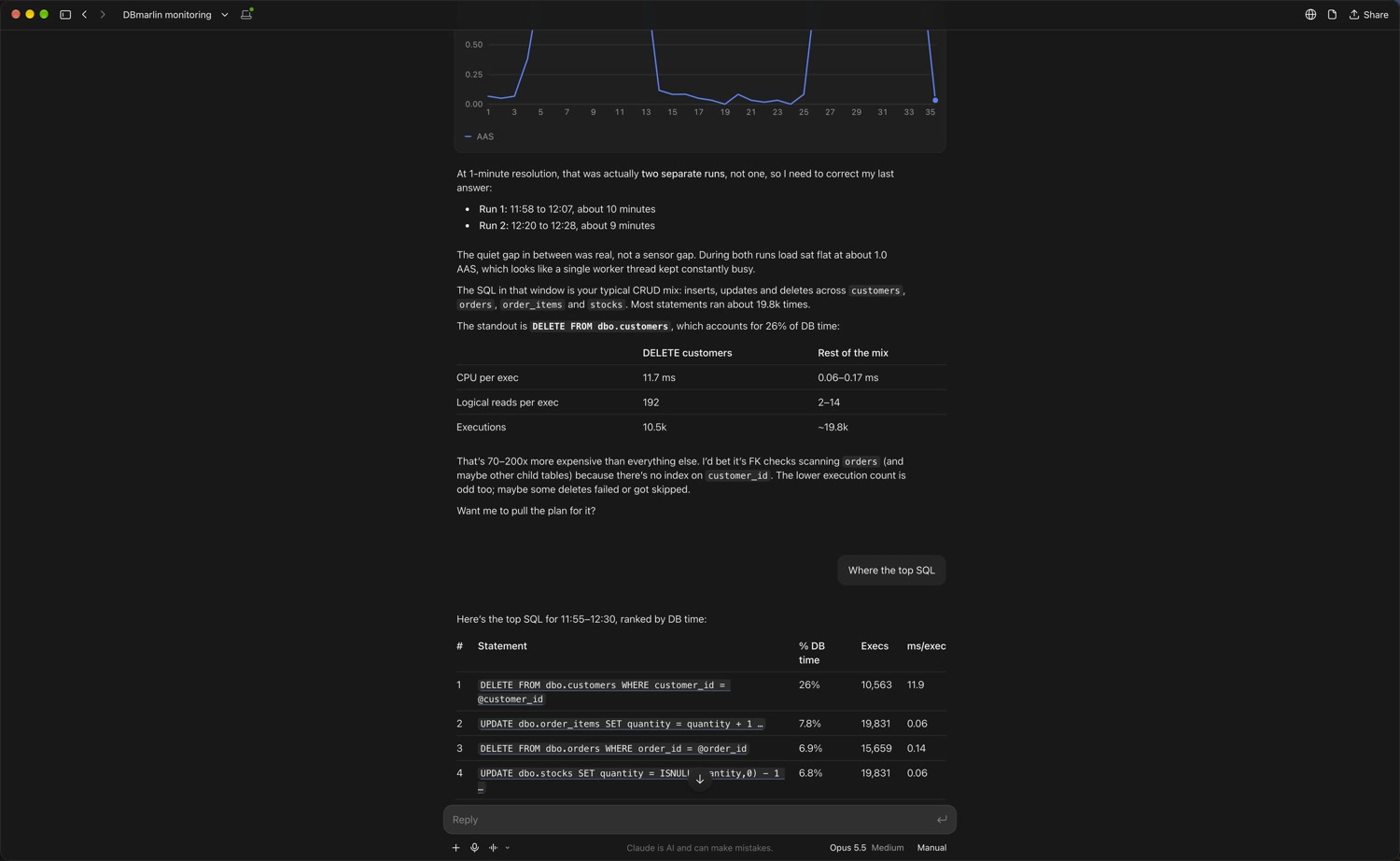
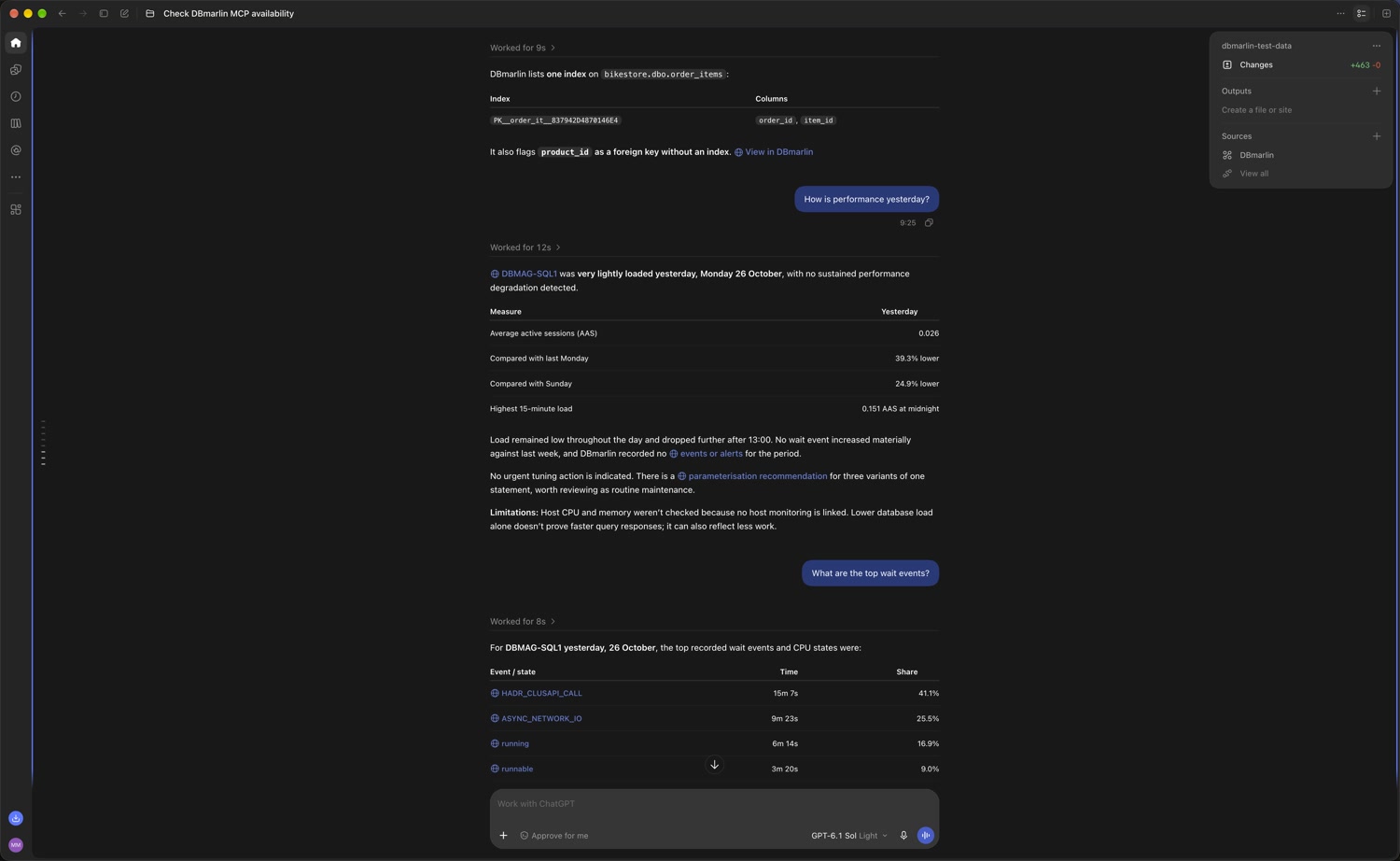
All the tools are read-only. The MCP server cannot change your DBmarlin settings or your monitored databases.
How it works
- The MCP server is an optional web application that runs in DBmarlin's Tomcat, in the same way as the Prometheus and New Relic integrations. It is reached through nginx at
/mcpon the same port as the web UI. - Claude Desktop uses the DBmarlin extension, which runs on your own machine and connects to DBmarlin over your network or VPN, the same way your browser does.
- Claude Code, Cursor and VS Code connect directly to
https://<dbmarlin-server>:9090/mcp. - DBmarlin does not need to be reachable from the internet.
Remote connectors in claude.ai and ChatGPT connect from the vendor's cloud, so DBmarlin would need to be reachable from the internet. They are not supported yet.
Installation
1. Deploy the MCP server
Copy mcp##<version>.war from the extras folder of your DBmarlin installation to tomcat/webapps. Tomcat deploys it automatically.
If you are upgrading, make sure no older mcp##<version>.war files are left in tomcat/webapps.
2. Check the nginx configuration
DBmarlin 6.10 and later ship with the nginx configuration the MCP server needs, in nginx/conf/shared_server.conf. Check that the file contains a location ~ ^/mcp(/|$) block. If you added it yourself, restart nginx.
3. Enable authentication
We strongly recommend that you enable authentication before using the MCP server.
- The MCP server passes the caller's username and password on to DBmarlin. nginx checks the password, and DBmarlin applies the user's access control, so each user only sees the instances they are allowed to see.
- Without authentication, every MCP caller has admin access, the same as for the web UI.
- Keep Tomcat's port 9080 firewalled or bound to localhost, so that the MCP server can only be reached through nginx.
Connecting your AI assistant
Claude Desktop
Claude Desktop needs a Pro, Max, Team or Enterprise plan.
- Open
dbmarlin-mcp-<version>.mcpbfrom theextrasfolder of your DBmarlin installation, or drag it onto Settings > Extensions in Claude Desktop. - Enter:
- DBmarlin URL: the address you use for the DBmarlin web UI, for example
https://dbmarlin.example.com:9090. - Username and Password: your DBmarlin login. Leave these empty if DBmarlin has no authentication. The password is stored in your operating system's keychain.
- Allow self-signed certificate: select this if your DBmarlin server uses a self-signed HTTPS certificate.
- DBmarlin URL: the address you use for the DBmarlin web UI, for example
Enterprise admins can allowlist the extension and push it to their users.
Other clients
Claude Code, Cursor and VS Code connect directly to https://<dbmarlin-server>:9090/mcp. They send your DBmarlin login in an Authorization header. The value is Basic followed by the base64 encoding of username:password. To create it on Linux or macOS:
printf 'username:password' | base64
Keep this value out of your configuration files, especially project-level files that may be committed to git. The examples below read it from an environment variable called DBMARLIN_AUTH, or prompt for it. If DBmarlin has no authentication, leave out the headers block.
Claude Code
Add the server with one command. It is stored in your user configuration:
claude mcp add --transport http dbmarlin https://dbmarlin.example.com:9090/mcp --header "Authorization: Basic $DBMARLIN_AUTH"
Or share it with a project in .mcp.json:
{
  "mcpServers": {
    "dbmarlin": {
      "type": "http",
      "url": "https://dbmarlin.example.com:9090/mcp",
      "headers": { "Authorization": "Basic ${DBMARLIN_AUTH}" }
    }
  }
}
Cursor
Add the server to ~/.cursor/mcp.json for all projects, or .cursor/mcp.json for one project:
{
  "mcpServers": {
    "dbmarlin": {
      "url": "https://dbmarlin.example.com:9090/mcp",
      "headers": { "Authorization": "Basic ${env:DBMARLIN_AUTH}" }
    }
  }
}
VS Code
For GitHub Copilot agent mode, add the server to .vscode/mcp.json or your user mcp.json. VS Code asks for the value once and stores it securely:
{
  "inputs": [
    {
      "id": "dbmarlin-auth",
      "type": "promptString",
      "description": "DBmarlin: base64 of username:password",
      "password": true
    }
  ],
  "servers": {
    "dbmarlin": {
      "type": "http",
      "url": "https://dbmarlin.example.com:9090/mcp",
      "headers": { "Authorization": "Basic ${input:dbmarlin-auth}" }
    }
  }
}
Other stdio clients
Clients that run MCP servers as a local command, such as Windsurf, Cline and Codex CLI, can run the same bridge that the Claude Desktop extension uses. The .mcpb file is a zip file. Extract it and point the client at server/index.js, which needs Node.js 18 or later. For example:
{
  "mcpServers": {
    "dbmarlin": {
      "command": "node",
      "args": ["/path/to/dbmarlin-mcp/server/index.js"],
      "env": {
        "DBMARLIN_URL": "https://dbmarlin.example.com:9090",
        "DBMARLIN_USERNAME": "username",
        "DBMARLIN_PASSWORD": "password"
      }
    }
  }
}
Set DBMARLIN_ALLOW_SELF_SIGNED to true if your DBmarlin server uses a self-signed certificate.
Using the MCP server
Ask questions in plain language. Give the instance name and a time range where you can. For example:
- Triage DBMAG-SQL1 between 11:30 and 1pm today. The assistant runs a triage and writes a root cause report with links into DBmarlin.
- Tell me more about that DELETE statement: who ran it and what was it waiting on? A follow-up question that looks at one SQL statement in detail.
- Were there any availability group problems on SQL1 yesterday morning? Looks at events and SQL Server health.
- Compare this morning's load on prod-pg1 with the same time last week.
- Which indexes on the orders database are unused?
- Find the statements that update the customer table.
- How is performance on ORARAC01 right now?
- What are the largest tables in ORARAC01?
- How does this SQL statement perform?
SELECT ...Paste the SQL text. DBmarlin fuzzy matches it to find the statement in any of your monitored databases.
The rca prompt
The MCP server also provides a prompt called rca. It fills in a full root cause analysis request, including the report format, from the instance, the time range and an optional time zone. Asking in plain language works just as well. The prompt only saves typing.
- Claude Desktop: click + > Connectors, scroll down, then select Add from DBmarlin > rca. Fill in the instance, when and (optionally) the time zone, click Add prompt, then send.
- Claude Code: type
/mcp__dbmarlin__rca DBMAG-SQL1 "11:30 to 1pm today" Europe/London. The server name is the one you used inclaude mcp add.
What triage does
When you ask for a triage, the MCP server does most of the work itself, rather than the assistant making many separate requests:
- It fetches the following at the same time:
- activity for the time range, for the same time range a week earlier, and for the period just before
- blocking, deadlocks, events from the hour before, parameter changes, sensor status, host metrics, recommendations and SQL Server health
- For the SQL statements that changed most, it fetches their plan history, SQL statistics and baseline activity.
- It runs a set of rules that check:
- Load: when the problem started, peaked and recovered, compared with the normal range for the baseline
- Wait events and SQL statements: their share of the increase, and whether they are new
- Workload: whether statements ran more often, or each execution got slower
- Plan changes
- Blocking and deadlocks
- Changes and alerts: whether each one came before or after the problem started
- Parameter changes
- Host saturation: CPU, memory and I/O
- SQL Server: availability groups, SQL Agent jobs and tempdb
- Data quality: for example, gaps in collection
- It returns ranked findings with evidence, links and recommended actions, plus a timeline.
Load is measured in average active sessions (AAS): wait time divided by elapsed time.
Tools
These are the tools the MCP server provides. The assistant chooses which ones to use based on your question.
| Tool | Description |
|---|---|
triage_instance | Root cause analysis for an instance over a time range. See What triage does. |
list_instances, get_instance | The monitored instances, what each one collects, its hosts and availability groups. Also returns the DBmarlin server's current time. |
get_activity_breakdown | Wait time by wait event, SQL statement, session, user, database, client, program or module. |
get_activity_time_series | Wait time over time, with filters. |
get_top_sql | Top SQL by wait time, executions, duration, CPU or any other collected SQL statistic. |
search_sql | Find statements from a fragment of SQL text, across all instances or one, like the SQL Search screen. |
get_sql_details | One SQL statement: its text, waits, users, statistics over time and plan history. |
compare_periods | Compare a time range with a baseline. The default baseline is the same time a week earlier. |
get_events | Alerts, detected changes and custom events for the instance and its hosts. |
get_blocking, get_deadlocks | Blocking trees, and deadlocks with an optional deadlock graph. |
get_host_metrics | Host CPU, memory, I/O and disk utilisation. |
list_statistics, get_db_statistics | Database performance statistics. |
get_parameter_changes | Configuration parameter changes and detected changes. |
get_recommendations | Open recommendations. |
get_table_sizes, get_index_sizes | The largest tables and indexes from the Object Browser, with their insights. |
get_object_details | One table or index: its size, columns, distinct values, indexes and insights. |
get_object_insights | Unused indexes, foreign keys without an index, tables with no primary key, and tables with missing optimiser statistics. |
get_sqlserver_health | SQL Server tempdb, SQL Agent jobs and availability group health. |
Configuration
You can change the MCP server's settings in tomcat/webapps/mcp##<version>/META-INF/context.xml. Restart DBmarlin Tomcat after making changes.
| Parameter | Default | Description |
|---|---|---|
archiver_url | http://localhost:9080/archiver | The DBmarlin archiver to query. |
dbmarlin_url | (empty) | The DBmarlin UI address used in links. When empty, it is worked out from the request. |
sql_text | full | How much SQL text is sent to the AI assistant: full, truncated or none. |
sql_text_max | 1000 | The maximum length of SQL text when sql_text is truncated. |
default_tz | The server time zone | The time zone used when the assistant does not give one. |
max_parallel | 8 | Controls how many requests the MCP server makes to the archiver at the same time. |
timeout_ms | 60000 | How long to wait for the archiver, in milliseconds. Keep it under half of nginx's 180 second timeout for /mcp, because a triage makes two rounds of requests. |
allowed_origins | (empty) | The browser origins allowed to call the MCP server. Desktop and command-line clients do not send an origin, so they are always allowed. |
Security and privacy
- Data sent to the AI provider: the results of each tool are sent to your AI assistant's provider, including SQL text. To limit this, set
sql_texttotruncatedornone. See Configuration. - No connection details: the MCP server never returns connection details, usernames or passwords for your monitored instances.
- Access control: each user only sees the instances their DBmarlin login allows.
- Input validation: every value the assistant passes to the MCP server is checked before it is used. For example, times must be valid times, time zones must be valid IANA time zones, and statistic names must be known statistics.
- Browser requests: requests from a browser origin that is not in
allowed_originsare refused. This protects against DNS rebinding attacks.
Troubleshooting
To test the MCP server without an AI assistant, run the MCP Inspector and connect it to https://<dbmarlin-server>:9090/mcp:
npx @modelcontextprotocol/inspector
Limitations
The following are not supported yet:
- OAuth, which remote connectors in claude.ai and ChatGPT need.