Backups
New in DBmarlin 6.10.0. Currently SQL Server only.
The Backups screen shows the backup history of your SQL Server databases. DBmarlin monitors for failed backups, overdue backups and broken backup chains, and shows how far back each database can be restored.
Requirements
DBmarlin reads backup history from msdb and finds failed backups in the SQL Server error log. See Permissions for backup history for the permissions the monitoring user needs. If the error log cannot be read, for example on AWS RDS, backup history is still collected but failed backups are not shown.
Backup history is not available for Azure SQL Database, which has no msdb.
Turning backup monitoring on or off
Backup history is collected by default for SQL Server instances. To change this, edit the instance in Database Instance settings and select or clear Collect Backup History.
When collection first starts, DBmarlin backfills the backup history in msdb for the data retention period. After that, it collects new backups as they complete.
Using the Backups screen
Open Backups from the Analysis section of the menu. The menu item only appears when at least one SQL Server instance is monitored.
Use Filter By to limit the screen by DB Type, Instance or Tag. The System Databases filter excludes master, model and msdb. Use the period drop-down to choose the last hour, 24 hours, 7 days or 30 days.
Summary cards
| Card | Description |
|---|---|
| Databases backed up | Databases with at least one full or differential backup. |
| Databases not backed up | Databases with no full or differential backup. |
| Backup coverage | The percentage of databases that have been backed up. |
| Needs attention | Databases that have never been backed up, have a failed backup, have a broken backup chain or chain warning, or have no log backups although the recovery model needs them. |
An availability group database counts once, however many replicas it has. Click a card to show only those databases in the table below. Click the x on the Showing badge to show all databases again.
Current backup chain
The table shows one row per database, with its latest full, differential and log backups. Only a differential backup taken since the latest full backup is shown. For each backup, the table shows the start date, duration and size. Availability group databases show the availability group name, the primary replica and the secondary replicas.
| Column | Description |
|---|---|
| Warning | Shown when a backup has failed since the last successful one, the backup chain is broken or has a warning, the database has never been backed up, or there are no log backups although the recovery model needs them. Hover over the icon for details. |
| Alert | Shown when a backup alert has been raised for the database. |
| Recovery model | The database recovery model: FULL, BULK_LOGGED or SIMPLE. |
| Log chain | The status of the log backup chain. See Log chain status. |
| Worst RPO | The longest time without a new backup to restore from, which is the most data you could have lost. |
Use the search box to find a database by name.
Log chain status
To restore a database to a point in time, you need an unbroken chain of log backups since the latest full or differential backup. DBmarlin checks the chain using the LSNs (log sequence numbers) recorded for each backup.
| Status | Meaning |
|---|---|
| OK | The log chain is unbroken. |
| Broken | There is a gap in the log backups, so the database cannot be restored to a point in time after the gap. A gap can also happen when the database was switched to the SIMPLE recovery model and back. The chain is fixed by the next full or differential backup. |
| Warning | The chain may need checking. For example, an ad hoc full backup reset the differential base, or log backups were taken but the recovery model is now SIMPLE. |
| Unverified | The chain cannot be fully checked, because SQL Server has taken a log backup that is not in DBmarlin's history, or there is a possible gap (see below). |
Hover over the status to see the reason and the point-in-time restore window.
For availability group databases, log backups may be taken on any replica. If a replica is not monitored by DBmarlin, a gap in the log backups is shown as a possible gap rather than a chain break, and the status is Unverified rather than Broken, because the missing log backups may have been taken on that replica.
Backup history
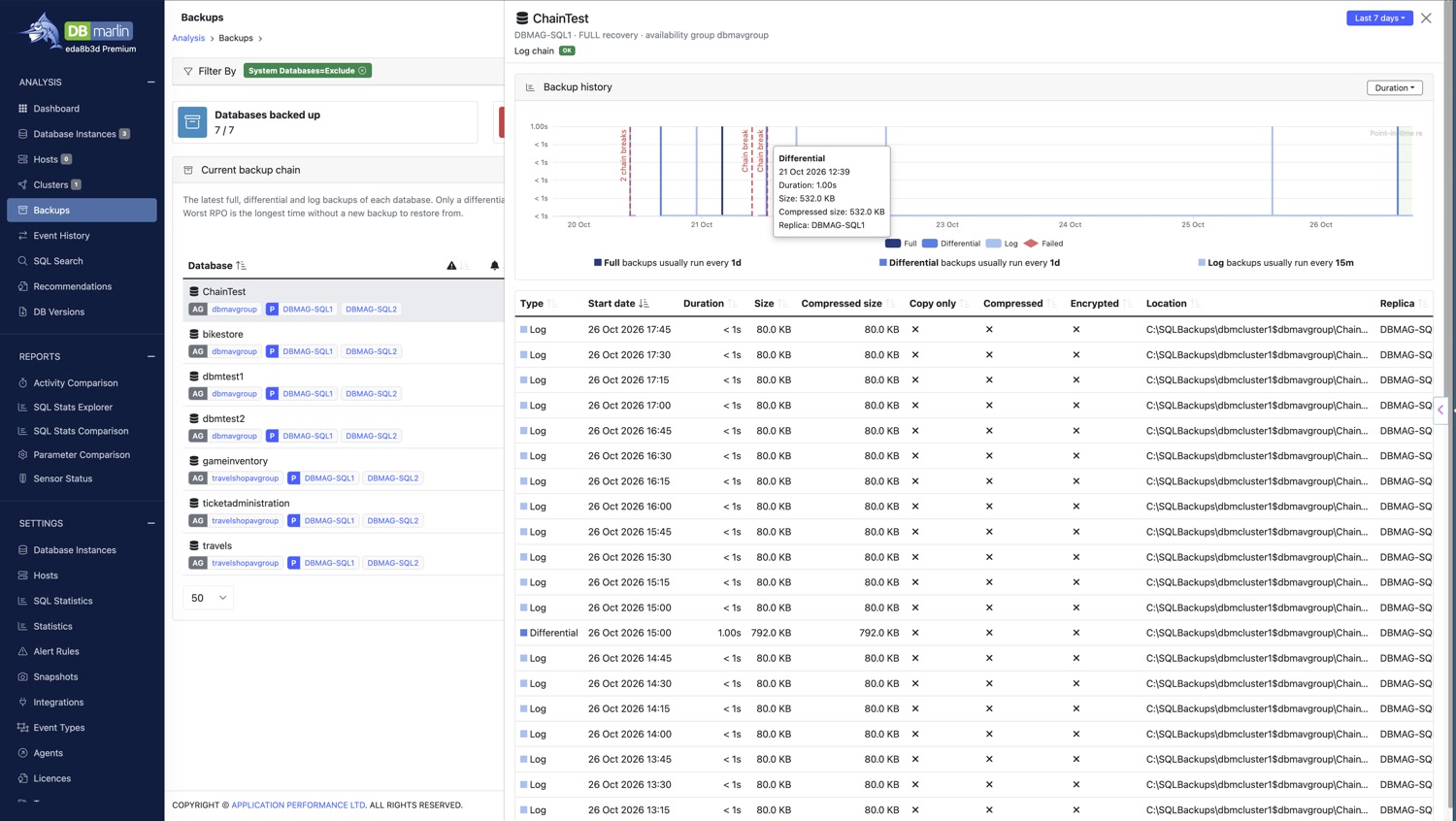
Click a database to open its backup history.
The chart shows each backup over the selected period. Use the drop-down to plot Duration, Size or Compressed size. Failed backups, chain breaks and backup alerts are marked on the chart. Below the chart, DBmarlin shows how often each type of backup usually runs.
The table lists each backup with its type, start date, duration, size, compressed size, location and the replica it was taken on. It also shows whether the backup was copy only, compressed or encrypted.
Backup alerts
DBmarlin includes four built-in alert rules for backups. They are disabled by default. To use them, enable them in Alert Rule settings. The rules are checked for each database every 5 minutes.
| Alert rule | Default thresholds |
|---|---|
| Backup failed (built-in) | Critical when a backup fails. |
| Full backup overdue (built-in) | Warning when the latest full backup is more than 25 hours old. Critical when it is more than 49 hours old. |
| Log backup overdue (built-in) | Warning when the latest log backup is more than 60 minutes old. Critical when it is more than 240 minutes old. |
| Backup chain broken (built-in) | Critical when the log backup chain is broken. |
You can change the thresholds to match your backup schedule. Backup alerts also appear on the Events screen.